









ANTIK Ultra Nano TV Stick
Dimensions: 86 × 25 × 11 mm
Weight: 27g
Power supply: 5V/1A (USB-C)
GPU: Mali-G31
CPU: Amlogic S905Y4, 4x Cortex-A35
RAM: 2GB DDR4-2666
Connectivity: Wi-Fi 6 (802.11ax, 2.4 / 5 GHz), Bluetooth 5.4
Video support: H.265 / HEVC, H.264, MPEG, WMV, AVS, MP2
Audio support: MPEG, MP3, AAC, FLAC
Operating system: Linux
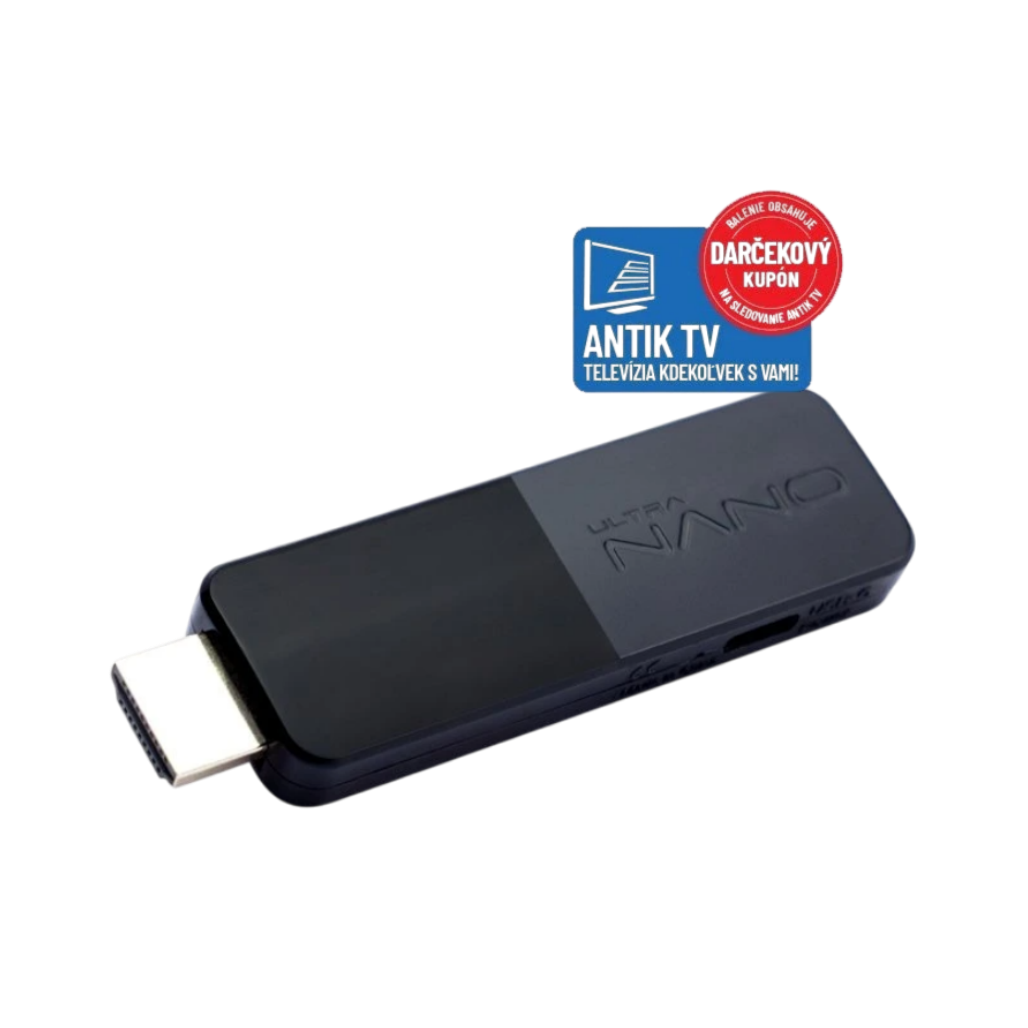
Ultra Nano TV Stick - Television without compromise in a mini format. Discover the smallest and most practical way to turn your TV into a smart entertainment center. Ultra Nano TV Stick from Antik is a powerful IPTV receiver the size of a USB stick that you simply plug directly into the HDMI port of your TV.
ANTIK Ultra Nano TV Stick AWS 2654 UN:


Watch Slovak and Czech programs for free
The free entry package includes several interesting Slovak or Czech programs. Additional programs can be obtained by purchasing paid packages, including HD or 4K programs. The unique TV Plugin function allows you to add your own video sources and TV channels, such as cameras or internet streams, to the program list .
Maximum performance in a mini format
Despite its extremely small size, the Ultra Nano TV Stick offers full-fledged performance comparable to standard set-top boxes. With dimensions of 86 × 25 × 11 mm, it plugs directly into the HDMI port and fits perfectly with wall-mounted TVs. The Amlogic S905Y4 processor with four Cortex-A35 cores guarantees smooth video decoding and fast response. Combined with the Mali-G31 graphics core and 2 GB of DDR4-2666 memory, it ensures stable performance even when playing HD content. Passive cooling ensures quiet operation and a long service life of the device.
- Miniature dimensions, full performance of an IPTV receiver
- Amlogic S905Y4 + Mali-G31 for smooth operation
- Passive cooling with no moving parts
- Energy-saving power supply 5 V / 1 A
- Discreet placement behind the TV


IPTV and streaming features
The device allows direct access to Antik IPTV services without the need for an antenna, satellite or cable connection. Users can watch live broadcasts, use the TV archive , TimeShift or plan a program via the electronic program guide (EPG) . Applications such as Podmaz, iKostol.sk, Kukaj.sk and other multimedia platforms are also available. The system provides quick access, automatic updates and supports remote management. Thanks to the intuitive interface, operation is simple and fast.
- Live broadcast without antenna or cable
- TV archive and TimeShift features
- Integrated multimedia applications
- Electronic Program Guide (EPG)
- Automatic system updates

Plug & Play for immediate use
The Ultra Nano TV Stick is designed with ease of installation and immediate functionality in mind. Simply plug it into your TV's HDMI port and power it on - it will automatically boot up and be ready to watch digital TV. All necessary settings, updates and network services are pre-configured, so there's nothing for the user to install or configure.
- No software installation or manual setup required
- Automatic recognition when connected to HDMI port
- Quick start-up and instant access to TV content
- Wi-Fi connection without the need for additional cables
Complete connection in two steps
- Plug the HDMI connector into the TV.
- Connect the power cable (USB-C)

High quality picture and sound
The Ultra Nano TV Stick can handle virtually any video and audio format, so you can watch movies, series, or IPTV content in the highest quality without restrictions. Hardware decoding of modern standards such as H.265/HEVC and H.264 means that the device can handle smooth playback of even demanding videos without stuttering or long loading times. The optimized Linux operating system ensures fast responses and reliable operation, even when the device is running continuously.
Thanks to support for audio formats such as MP3, AAC or FLAC, you can enjoy clear, dynamic sound without loss of quality.
- H.265/HEVC hardware decoding
- Efficient compression for data savings
- Support for all common audio formats
- Smooth playback in Full HD quality
- Optimized Linux system for stability

Wireless connection and control
The device supports the modern Wi-Fi 6 (802.11ax) standard, which guarantees a stable connection and high transfer speed even in a dense network. Thanks to Bluetooth 5.4, it is possible to conveniently use a wireless controller or connect external devices. The compact Bluetooth remote control with a learning function eliminates the need for direct pointing at the receiver. The device works completely without cables and only requires Wi-Fi with a speed of at least 6 Mbps. All network functions are optimized for smooth IPTV streaming.
- Dual-band Wi-Fi 6 (2.4 / 5 GHz)
- Bluetooth 5.4 with remote learning support
- Stable connection for IPTV and VoD
- Low latency for fast response
- No need for network cables

A TV you can take anywhere
ANTIK Ultra Nano TV Stick is a modern way to have a full-fledged television anywhere - at home, at the cottage or on the go. Thanks to its ultra-compact dimensions, you can easily put it in your pocket or bag and connect it to any TV with an HDMI port.
It doesn't need an antenna, a wired connection or additional devices - just Wi-Fi and USB power. No cables, no installation, just instant access to your favorite programs and apps.

Package contents and technical information
The ANTIK Ultra Nano TV Stick is designed for immediate use - no complicated installation or setup required. It is ready to use immediately after connecting to an HDMI port and powering via USB-C. Its compact dimensions allow for discreet placement behind the TV, while the remote control provides full control over playback, TV archive and applications.
Package contents:
- 1× ANTIK Ultra Nano TV Stick
- 1× Remote control
- 1× User manual
Technical information
- Device dimensions: 86 × 25 × 11 mm
- Weight: 27g
- Power supply: 5V/1A (USB-C)
- Connection: HDMI 2.0

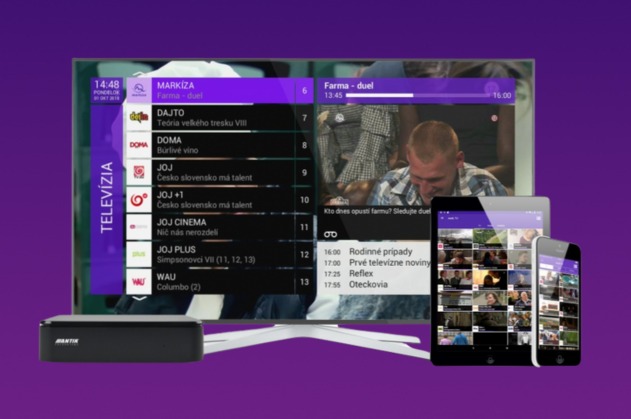
Clear user interface on TV
The Ultra Nano TV Stick interface is designed for simple and intuitive operation , allowing quick access to all functions directly on the screen.
The user immediately sees a list of available TV channels, current and upcoming shows, and a preview of live broadcasts. Additional functions, controlled by the colored buttons on the remote control, make channel management and content filtering as efficient as possible.


FAQ: ANTIK Ultra Nano TV Stick
The position of the HDMI port does not allow direct connection of a TV stick
Use an HDMI extension cable, which can be purchased at any electronics store.
The included USB cable is short
Use a longer USB-C cable, for example one that is also suitable for use with a power adapter (5 V / 1 A).
The TV shows a picture but no sound
Check all items related to the TV type and connection method in the menu > Settings > Set-top box > TV output.
Turn up the volume on both the remote control and the TV stick.
TV stick won't start
Check if the TV stick is properly connected to the HDMI port of the TV.
Make sure the correct HDMI input is set.
If you are using an extension cable, try plugging the stick directly into the TV.
Verify that USB power is provided (5V/1A).
The remote control is not responding.
If the red LED is on, the remote control is not paired via Bluetooth - repeat the pairing.
If necessary, restart the TV stick by disconnecting the power.
TV stick froze
Switch to another channel or restart the device by disconnecting the power.
The channel list is empty.
Check the Wi-Fi connection status and start the resource refresh via the context menu (button no. 7 on the remote control).
If that doesn't help, restart the device by disconnecting and reconnecting the power.
The image is "squared"
Check the quality of your Internet connection or restart your device.
The image appears to be of poor quality.
Check the correctness of the TV output settings in menu > Settings > Set-top box > TV output.
Also check the default channel quality in menu > Settings > Set-top box > Interface.
Everything seems to be set up correctly, but the TV channels are not working
Check the quality of your Internet connection or router connection.
Restart the TV stick if necessary.
Do you have a question about a specific product, its features, technical parameters, or automation options in your home? We are here for you and will be happy to help you choose the right solution or explain the settings.
Write to us at predaj@antik.sk and our team of experts will respond to you as soon as possible. Your satisfaction and the proper functioning of your devices are our priority.