







ANTIK ATK-SHC5Y2 Home Swivel WiFi Camera 5.0 MP
- Resolution:
a) main stream: 5MP (2880x1632)
b) sub-stream: VGA (640x480)
- Image sensor: 1/2.7" CMOS Color Sensor 5MP
- Illumination: 0.1 lux / F 1.2
- Frame rate: 25fps
- Viewing angle:
a) panorama: 355°
b) tilt: 90°
- Video compression: H.264/H.265
- Image settings: image rotation, motion detection
- Night vision: 6 built-in LEDs, 5 meter range
- White Balance/BLC: Auto
- Audio input/output: microphone (8 ohm/2-3W, -36 dB), 2-way audio
- Connection: 2.4 GHz WiFi (IEEE 802.11 b/g/n)
- Alarm: picture, video recording
- Power supply: DC 5V/1.5A, USB-C
- Memory: MicroSD card (max. 128 GB)/cloud
- Operating temperature: -10°C to +50°C
- Operating humidity: 10 to 80% (non-condensing)
The ANTIK Smart indoor camera ATK-SHC5Y2 with a resolution of up to 2,880 × 1,632 px will always tell you what is happening in your home when you are not at home. It informs you of any unwanted visitors 24 hours a day. You monitor everything using the free ANTIK SmartHome® application. The main functions include motion detection as well as optional motion tracking. In the first case, recording will be started, or an alarm will be triggered with the interconnected ANTIK smart siren ATK-SS01. Tracking motion with a constant focus on the intruder will ensure that he does not escape from the field of view. The camera can rotate a full 360°. In addition to possible operation within the RJ45 LAN port, it can also be connected to a 2.4 GHz Wi-Fi network.
ANTIK Smart Camera SHC 5Y2: Instructions in .PDF can be downloaded HERE.

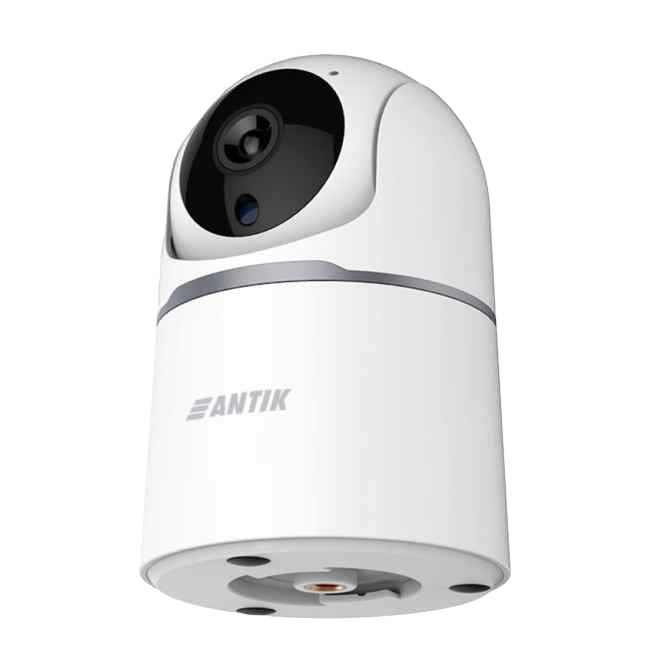
Compact WiFi camera with 5MP resolution and night mode
ANTIK Smart Camera SHC 5Y2 offers 5MP resolution for an exceptionally sharp and clear image that captures every detail of the monitored scene. Thanks to the advanced image sensor and automatic white balance, it provides realistic color display. Integrated night vision with a range of up to 5 meters ensures continuous monitoring even in complete darkness , so you have your space under control 24/7.
- Resolution: 2880 × 1632 (5MP) at 25fps
- Night vision: 6 LEDs, range up to 5 m
- Automatic day/night mode switching

Flexible control with PTZ and wide angle view
With the PTZ (Pan-Tilt-Zoom) function, you can control the camera directly from the app and smoothly rotate it horizontally and vertically. With a 355° panoramic view and a 90° tilt, a single camera can effectively cover a large area without the need to install multiple devices. This makes it an ideal choice for entrances, open spaces and larger rooms.
- Panorama: 355° horizontal
- Tilt: 90° vertical
- Easy control via app

Easy connectivity, storage and efficient record management
ANTIK Smart Camera SHC 5Y2 connects via Wi-Fi 2.4 GHz, which allows for quick installation without the need for a wired connection. You can save video recordings locally on a MicroSD card or in cloud storage, while efficient H.265 compression saves storage space and bandwidth. All camera management, recordings and notifications are conveniently done via the Antik Smart Home app.
- Wi-Fi connection 2.4 GHz (IEEE 802.11 b/g/n)
- Storage on MicroSD (max. 128 GB) or cloud
- H.264/H.265 video compression for data saving

Two-way communication, motion detection and built-in siren
The camera is equipped with a built-in microphone and speaker , which supports two-way voice communication in real time . So you can not only hear what is happening around the camera, but also talk remotely - directly via the mobile app.
Usage examples:
- 💬 Help a family member find the item they're looking for, even when you're not home.
- 🐶 Calm a dog/puppy that is home alone and reacts to unfamiliar sounds.
- 👨👩👧 Let your children know it's time to put away their toys or go to bed.
- 🚨 You will intervene in the event of a violation of the space by a suspicious person moving near the object.

Package contents and technical information
Thanks to intuitive connection and easy operation, the device is also suitable for users without technical knowledge.
Package contents:
- 1× Camera
- 1× USB-C adapter 5.0V 2.0A
- 1× USB-C/USB-C cable
- 2× Screw and dowel
- 1× Wall mount
- 1× Manual
Technical information:
– Warranty: 2 years
– Turning on the product: To turn on the camera, you need to connect the DC 5V/2A power supply. The camera will then automatically initialize and is ready for use after a short startup.
– Use: The device is intended for indoor use only (IP20).

For more details, watch the accompanying video
Step into the world of Smart technologies with us, where we will introduce smart products from the areas of home, security, comfort, health, camera systems and many other areas. Choose from a variety of smart devices that will reliably secure your home, business, garage or cottage.


Download the ANTIK SmartHome® app
The ANTIK Smart Camera SHC 5Y2 is controlled via the Antik Smart Home application, which offers a clear interface and wide range of setting options.
Main control functions:
- Live View: View video from the camera in real time.
- PTZ control: Move the camera horizontally and vertically via the app.
- Two-way communication: Using the talk-back function.
- Motion detection settings: Configure detection sensitivity and set notifications.
- Siren control: Activate and deactivate the built-in siren.
- View recordings: Access recordings stored on a Micro SD card or in the cloud.
- Night vision settings: Optionally switch night vision modes.
- Receive alerts: Notifications when motion is detected or other events occur.


Multi-column

Live preview and main menu
Adjust camera settings in detail directly while watching.
- Playback recordings: Quick access to saved videos.
- Image Gallery: View captured photos instantly.
- Night Vision: Turn on IR mode for a clear image even in the dark.
- Auto Tracking: The camera automatically tracks moving objects.
Long-term monitoring of the space with maximum overview.

Security and monitoring features
Manage all major sensors and alarms directly while monitoring the image.
- Motion Detection: Instantly alerts you to movement in the room.
- Sound Detection: Captures unusual sounds like a baby crying or noise.
- Patrol mode: The camera automatically rotates and monitors the area.
- Siren: Activate the built-in alarm to deter intruders.
It allows you to quickly respond to events even during live preview.

Remote control of camera direction
Easy control of camera pan and tilt directly from the app.
- Control the camera in real time and monitor what's happening remotely.
- Directional control: Pan the shot left, right, up, or down.
- HD picture: Watch high-definition video without lag.
- Audio control: Turn on the microphone to listen or communicate.
- Quick Actions: One click to take a screenshot or start recording.
Perfect for monitoring family members or pets from another room.

Preset positions
Quick access to important places in the room.
- Save 4 positions: Define the most frequently tracked points.
- One click: The camera moves to the selected position.
- Automation: Link positions to other sensors or scenes.
Preset positions save time and allow for immediate response.

Main device settings
Manage basic information and access to the device.
- Device Information: Displays device details including name, model, and connection.
- Tap-to-Run and Automation: Set up automations or quickly launch scenes with one click.
- Check Device Network: Verify the stability of the WiFi connection and the camera signal.
- Share Device: Share access to the camera with other household members.
The simple interface allows complete device management directly in the application.

Advanced alarm settings
Customize camera behavior according to security requirements.
- Detection Alarm Settings: Set motion detection with sensitivity selection.
- Siren Adjustment: Activate and adjust the intensity of the built-in siren.
- Preset Point: Save preset positions for quick camera rotation.
- Onvif: Support for camera integration into ONVIF systems.
- Offline Notification: Turn on notifications when your device is disconnected from the internet.
These features increase monitoring control and reliability.

Night vision (IR Night Vision)
Ensure a quality image even in complete darkness.
- Auto mode: The camera automatically switches between day and night mode.
- Off: Deactivate the infrared LEDs completely.
- Open: Permanently turn on IR for continuous black and white display.
IR night vision uses 6 LEDs with a range of up to 5 meters.
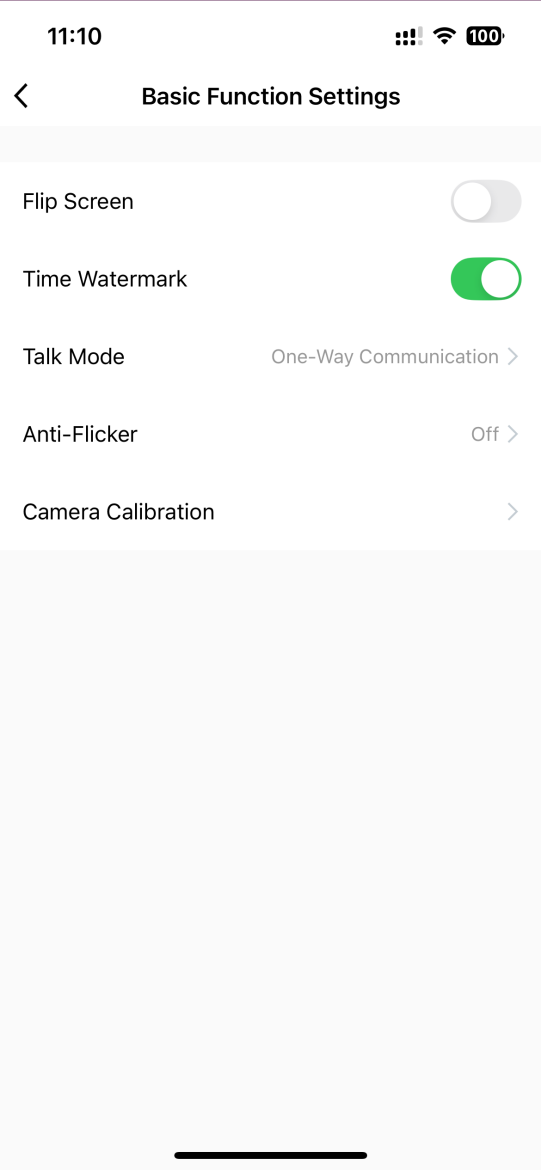
Basic functional settings
Customize the image, communication, and device orientation.
- Flip Screen: Invert the image when mounting the camera upside down (e.g. on the ceiling).
- Time Watermark: Add a time stamp to your videos.
- Talk Mode: Switch between one-way and two-way audio.
- Anti-Flicker: Eliminate image flickering under different light sources.
- Camera Calibration: Calibrate the camera position and movement axes.
It allows you to customize the display and communication according to the needs of the environment.

Advanced alarm settings
Customize camera behavior according to security requirements.
- Detection Alarm Settings: Set motion detection with sensitivity selection.
- Siren Adjustment: Activate and adjust the intensity of the built-in siren.
- Preset Point: Save preset positions for quick camera rotation.
- Onvif: Support for camera integration into ONVIF systems.
- Offline Notification: Turn on notifications when your device is disconnected from the internet.
These features increase monitoring control and reliability.

Automation and smart scenes
Automation is one of the most powerful features of a smart home. It allows devices to respond automatically based on specific inputs – such as motion, temperature changes, time, or manual instructions.
Its greatest advantage is the ability to connect multiple devices and create intelligent links between them. Thanks to automation, separate devices become a connected ecosystem that works logically and increases the overall comfort, security and efficiency of the home.
1. Manual start
The scene is triggered by manually pressing a button in the app or on the physical switch.
2. When the weather changes
Automation is triggered when external conditions change (e.g. temperature, humidity, wind).
3. Timetable
The scene will start at a specific time or according to a set recurring schedule.
4. When the device status changes *important
Automation is triggered in response to a change in another device – a motion sensor, door, camera, or other device.

Frequently Asked Questions: ANTIK Smart Camera SHC 5Y2
How do I connect the camera to a Wi-Fi network?
The camera supports Wi-Fi 2.4 GHz (IEEE 802.11 b/g/n) . After turning on, connect the device via the ANTIK SmartHome® application, follow the wizard and enter your network details.
Can the camera be used in complete darkness?
Yes. The camera is equipped with 6 IR LEDs with a range of up to 5 meters , which allows for high-quality images even in complete darkness in night vision mode.
Can I control the camera remotely?
Yes. Using the PTZ (Pan-Tilt) function , you can rotate the camera up to 355° horizontally and 90° vertically directly from the application.
What are the options for saving records?
You can save recordings either locally on a MicroSD card (max. 128 GB) or in cloud storage available through the app.
How does motion detection work?
The camera supports intelligent motion detection . When motion is detected, it will send you a push notification , save a picture/video, or trigger an alarm.
Do you have a question about a specific product, its features, technical parameters, or automation options in your home? We are here for you and will be happy to help you choose the right solution or explain the settings.
Write to us at predaj@antik.sk and our team of experts will respond to you as soon as possible. Your satisfaction and the proper functioning of your devices are our priority.